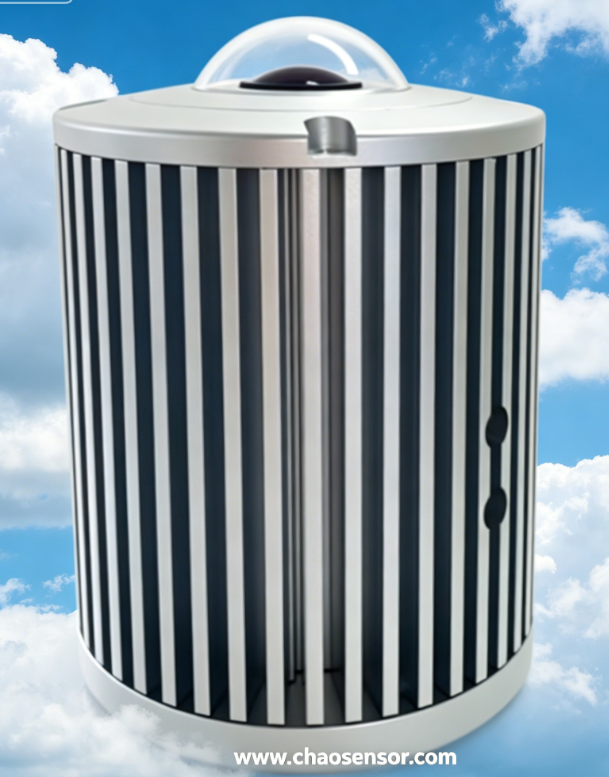
CC-C05 Series Cloud Cover Monitor (Local Edition)
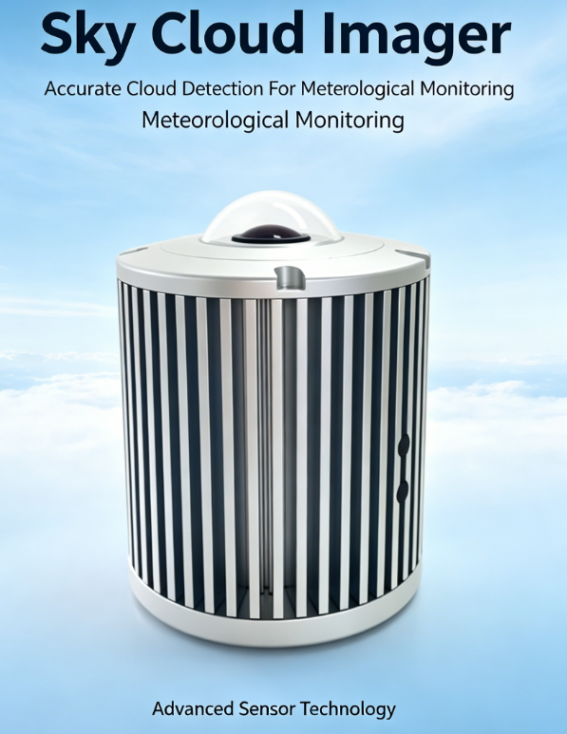
Product presentation
The Cloud Cover Monitor is a professional meteorological observation device specifically designed for precise measurement of cloud cover and solar transmittance. Utilizing advanced large-scale modeling algorithms combined with professional optical sensing technology, it calculates and analyzes cloud layer transmittance of sunlight in real time, providing users with high-precision cloud monitoring data. This device is suitable for applications in meteorological observation, environmental monitoring, climate research, weather forecasting, agricultural monitoring, and solar power generation. It helps users across various sectors better understand and predict weather patterns and their impacts on solar energy utilization.
Working Principle: Upon power-on, the system initiates initialization. After completion, it transmits designated messages. The system automatically performs image acquisition and analysis every minute, storing real-time results in cache while saving historical data at preset intervals. Clients can access real-time data and configure parameters via RS485 or cloud-based monitoring software.
Product Features
·Continuous observation of cloud cover in the whole sky is automatically carried out, and the 4K resolution is higher, so the calculation result of cloud cover is more accurate.
·The fully automatic deep learning technology quickly identifies and removes non-sky images and automatically optimizes features according to the situation on the scene.
·The professional optical bright light suppression system is not afraid of direct sunlight and can eliminate the capture of solar glare on cloud images.
·The self-developed pixel-level image algorithm can accurately analyze the image, and the data is more accurate and reliable.
·Professional ultraviolet protection coating technology, greatly provide optical device service life.
·Windows and device self-heating features are suitable for various application scenarios.
·Large model algorithm drive: Using advanced machine learning techniques and big data analysis, it can accurately calculate the amount of clouds in the sky and the proportion of sunlight passing through the clouds, providing more accurate data than traditional methods.
·Real-time data analysis and feedback: The device can analyze data in real time and quickly feed back the measurement results of cloud cover and solar transmittance to the user, supporting instant decision-making and analysis.
·Ease of use and interactivity: Equipped with an intuitive user interface, users can easily set up, monitor and interpret data. The software also includes data visualization tools to help users intuitively understand changes in cloud cover and light transmittance.
·Wide range of applications: it is not only suitable for professional meteorological and climate research, but also for agricultural production monitoring, solar power generation efficiency evaluation and other fields, to meet a wide range of application needs.
Feature Description
1、Read and set address
2、Read and set baud rate
3、Read and set latitude and longitude
4、Auto remove obstacles
5、Timing
6、Clear history
7、Set the data storage interval (software setting) range: 1 to 1440 minutes
Technical parameter
Technical parameter | City edition |
Image sensor resolution | 4K 1200W 4000*3000 plxels |
Focal distance | 1.5mm @F2.0 |
Angle of field | Horizontal field of view :210° Vertical field of view :210° Diagonal field of view :210° |
Wide Dynamic | WDR enhancement technique |
Noise-signal ratio | ≥50dB |
Optical bright light suppression system | Support |
Block the sun | Non-essential |
Clear | Support |
Photographic enhancement | Support |
Backlight Compensation | Support |
3D Digital Noise Reduction | Support |
Frequency of sampling | 60s~86400s |
Storage data | 200,000 items |
Network connection required | No internet connection required |
Presentation of information | Status flag Cloudiness level Sun shading rate Sky coverage Cloud usage ratio Multi-cloud ratio Half Shade Cloud coverage Latitude data Longitude data Solar elevation Sun azimuth oktas |
Output method | |
Wireless transmission | Nothing |
Working temperature | -40℃~80℃ |
Levels of protection | IP67 |
Power supply mode | Solar power/AC |
Service voltage | DC12V/AC220V |
Current Power Consumption | Maximum power consumption is 5W. The average power consumption during normal operation is 3.6W. |
Data/power line | 10m(standard configuration) |
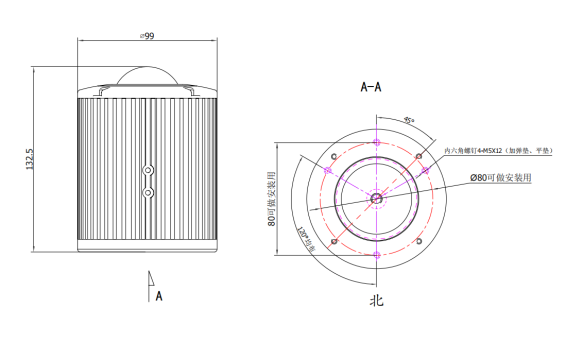
Dimensions
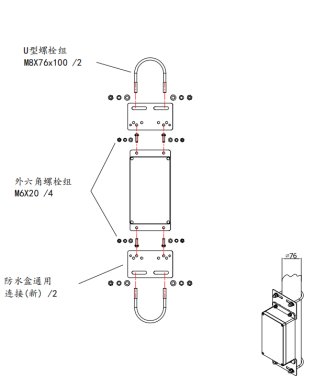
Product installation diagram
Display of software interface and data reading
Software interface
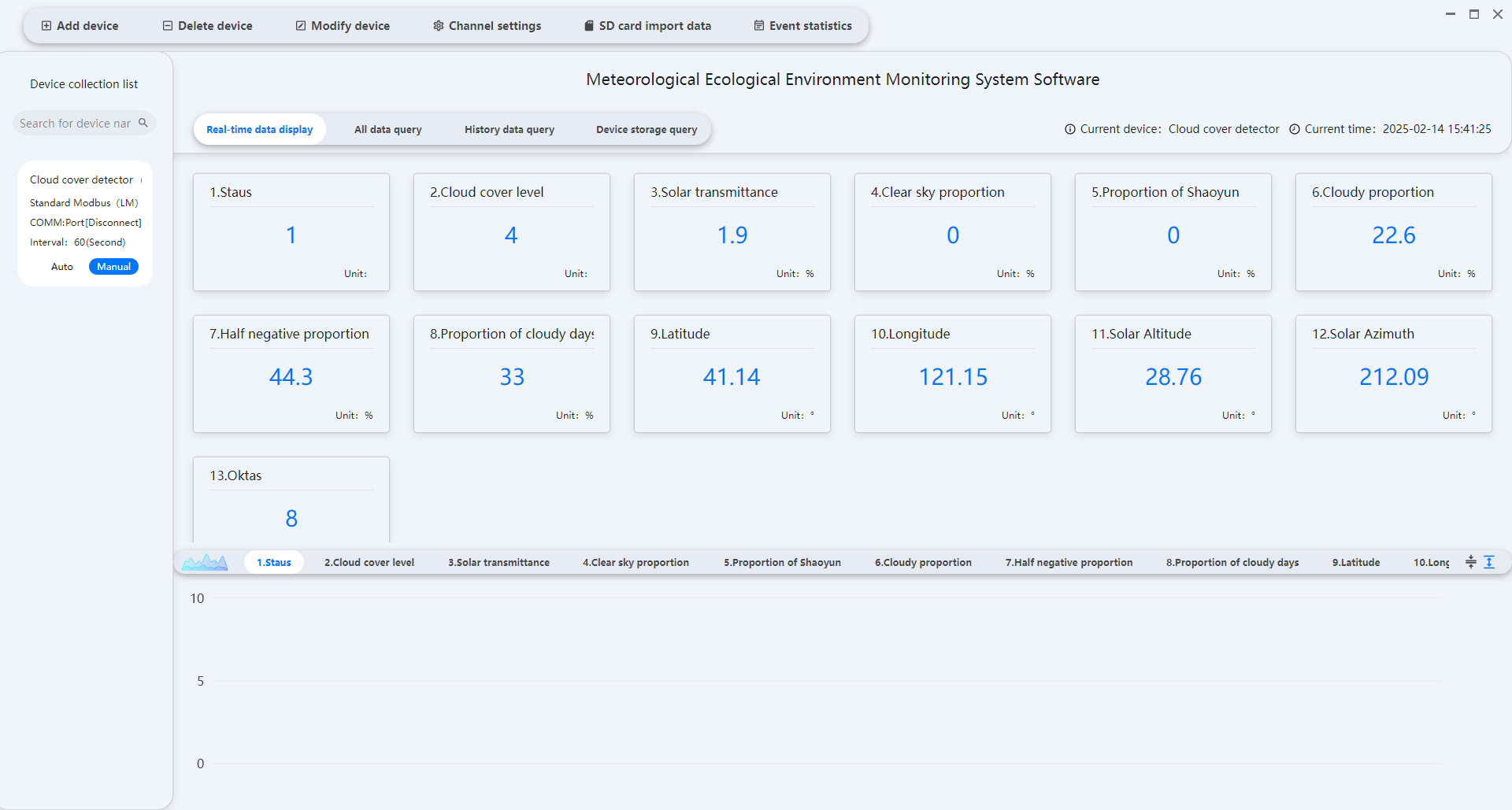
Data read
Local version: The cloud monitoring instrument uses RS485 communication. The serial port parameters are set to 9600 baud rate, 8-bit data, no parity, and 1 stop bit by default. It employs the Modbus-RTU communication protocol.
【1】 Read real-time data packets
The host computer sends: 01 03 00 00 00 11 85 C6
名称 Name | 字节数 Byte count | 说明 Explain |
设备地址 Device address | 1 | 0xXX:设备地址 Device address |
功能码 Function code | 1 | 0x03:读寄存器功能码 Read register function code |
寄存器起始地址高字节 High byte of the register start address | 1 | 0xXX |
寄存器起始地址低字节 Low byte of the register start address | 1 | 0xXX |
读取寄存器数量高字节 Read high byte of register count | 1 | 0xXX |
读取寄存器数量低字节 Read register number low byte | 1 | 0xXX |
CRC校验 CRC verification | 2 | CRC校验 CRC verification |
1、 主机寄存器表:Host Register Table
寄存器地址 Register address | 数据名称 Data name | 说明 Explain | 小数位数 Decimal digits | 单位 Unit |
0x0000 | 状态标志 Status flag | 1为有效数据,0为无效数据 1 indicates valid data, 0 indicates invalid data | 无小数 No decimal | 无 Nothing |
0x0001 | 云量等级 Cloudiness level | 云量等级:1晴天 2少云 3多云 4重云 5阴天 Cloud level: 1 sunny 2 few clouds 3 cloudy 4 heavy clouds 5 cloudy | 无小数 No decimal | 无 Nothing |
0x0002 | 当前云量 Current cloudiness | 当前云量百分比 Current cloud percentage | 1位小数 One decimal place | % |
0x0003 | 晴空占比 Clear sky percentage | 当天晴空情况的占比比例 The percentage of clear skies that day | 1位小数 One decimal place | % |
0x0004 | 少云占比 Cloud usage ratio | 当天少云情况的占比比例 The percentage of days with little cloud | 1位小数 One decimal place | % |
0x0005 | 多云占比 Multi-cloud ratio | 当天多云情况的占比比例 The percentage of cloudy days | 1位小数 One decimal place | % |
0x0006 | 半阴占比 Half Shade | 当天半阴情况的占比比例 The percentage of days with partial shade | 1位小数 One decimal place | % |
0x0007 | 阴天占比 Cloud coverage | 当天阴天情况的占比比例 The percentage of cloudy days | 1位小数 One decimal place | % |
0x0008 | 纬度数据 Latitude data | 0xXX XX XX XX:浮点型,字节顺序:ABCD 北纬为正数,南纬为负数。 例子: 如16进制为0x42 2C CC CD转换成浮点数:43.2°为北纬
如16进制为0xC2 2C CC CD转换成浮点数:-43.2°为南纬 0xXX XX XX XX:floating-point type, byte order: ABCD. north latitude is positive, south latitude is negative. Example: For example, converting hexadecimal 0x42 2C CC CD into a floating-point number: 43.2 is north latitude. For example, converting hexadecimal 0xC2 2C CC CD into a floating-point number: -43.2 is south latitude. |
| ° |
0x000A | 经度数据 Longitude data | 0xXX XX XX XX:浮点型, 字节顺序:ABCD 东经为正数,西经为负数。 例子: 如16进制为0x42 F2 66 66转换成浮点数:121.2°为东经
如16进制为0xC2 F2 66 66转换成浮点数:-121.2°为西经 0xXX XX XX XX:Floating-point type, byte order: ABCD east longitude is positive, west longitude is negative. Example: For example, convert the hexadecimal 0x42 F2 66 66 into a floating-point number: 121.2 is the east longitude. For example, convert the hexadecimal 0xC2 F2 66 66 into a floating-point number: -121.2 is the west longitude. |
| ° |
0x000C | 太阳高度角 Solar elevation | 0xXX XX XX XX:浮点型,字节顺序:ABCD 例子: 如16进制为0x41 BC 14 7B转换成浮点数:23.51° 0xXX XX XX XX:Floating-point, byte order: ABCD Example: Convert hexadecimal 0x41 BC 14 7B to a floating-point number: 23.51 |
| ° |
0x000E | 太阳方向角 Sun azimuth | 0xXX XX XX XX:浮点型,字节顺序:ABCD 例子: 如16进制为0x43 9B D4 7B转换成浮点数:311.66° 0xXX XX XX XX:Floating-point, byte order: ABCD Example: Convert the hexadecimal 0x43 9B D4 7B to a floating-point number: 311.66 |
| ° |
0x0010 | Oktas | 天空被云层遮挡,用“oktas”来衡量的,“oktas”是八分之一的单位。它记录了有多少八分之一的天空被云遮盖。 0 表示天空完全晴朗,而 8 表示天空完全阴暗 The sky is covered by clouds, measured in oktas, which is an eighth unit. It records how many eighths of the sky are covered by clouds. 0 means the sky is completely clear, while 8 means the sky is completely cloudy. | 无小数 No decimal | Oktas |
2、 如回复【设备地址】+ 90 00 + crc校验和,说明暂无实时数据
Reply with [device address] + 90 00 +crc checksum to confirm no real-time data is available.
【2】 读取通讯地址 Read the communication address
1、 上位机发送报文 The host computer sends a message.
名称 Name | 字节数 Byte count | 说明 Explain |
设备地址 Device address | 1 | 0xFF:广播地址,读取设备当前地址 Broadcast address, read the device's current address |
功能码 Function code | 1 | 0x03:读寄存器功能码 Read register function code |
寄存器起始地址高字节 High byte of the register start address | 1 | 0x01:这里固定0x01 Set to 0x01 |
寄存器起始地址低字节 Low byte of the register start address | 1 | 0x00:这里固定0x00 Set to 0x00 |
读取寄存器数量高字节 Read high byte of register count | 1 | 0x00:这里固定0x00 Set to 0x00 |
读取寄存器数量低字节 Read register number low byte | 1 | 0x01:这里固定0x01 Set to 0x01 |
CRC校验和 CRC check sum | 2 | CRC校验 CRC verification |
2、 主机应答报文 Host response message
名称 Name | 字节数 Byte count | 说明 Explain |
广播地址 Broadcast address | 1 | 0xFF:广播地址,读取设备地址 Broadcast address, read device address |
功能码 Function code | 1 | 0x03:读寄存器功能码 Read register function code |
字节长度 Byte length | 1 | 0x02:读取字节长度 Read byte length |
寄存器数据高字节 High byte of register data | 1 | 0x00:读取寄存器数据高字节 Read the high byte of the register data |
寄存器数据低字节 Register data low byte | 1 | 0xXX:读取寄存器数据低字节,返回主机地址 Read the low byte of the register data and return the host address |
CRC校验和 CRC check sum | 2 | CRC校验 CRC verification |
【3】 设置通讯地址 Set up mailing address
1、 上位机发送报文 The host computer sends a message.
名称 Name | 字节数 Byte count | 说明 Explain |
设备地址 Device address | 1 | 0xXX:设备地址 Device address |
功能码 Function code | 1 | 0x06:写寄存器功能码 Write register function code |
寄存器地址高字节 High byte of register address | 1 | 0x01:写入的寄存器起始地址高字节 Write the high byte of the register starting address |
寄存器地址低字节 Low byte of register address | 1 | 0x00:写入的寄存器起始地址低字节 Write the starting address of the register with the low byte first |
写入的数据高字节 Write the high byte of data | 1 | 0x00:写入的数据高字节,这里固定0x00 The high byte of the written data is fixed to 0x00 |
写入的数据低字节 Low byte of written data | 1 | 0xXX:写入的设备地址,范围:1-254 Write device address (range: 1-254) |
CRC校验和 CRC check sum | 2 | CRC校验 CRC verification |
2、 主机应答正确报文 Host response message
名称 Name | 字节数 Byte count | 说明 Explain |
设备地址 Device address | 1 | 0xXX:设备地址(原地址) Device address (original address) |
功能码 Function code | 1 | 0x06:写寄存器功能码 Write register function code |
寄存器地址高字节 High byte of register address | 1 | 0x01:写入的寄存器起始地址高字节 Write the high byte of the register starting address |
寄存器地址低字节 Low byte of register address | 1 | 0x00:写入的寄存器起始地址低字节 Write the starting address of the register with the low byte first |
写入的数据高字节 Write the high byte of data | 1 | 0x00:写入的数据高字节,这里固定0x00 The high byte of the written data is fixed to 0x00 |
写入的数据低字节 Low byte of written data | 1 | 0xXX:写入的设备地址,范围:1-254 Write device address (range: 1-254) |
CRC校验和 CRC check sum | 2 | CRC校验 CRC verification |
3、 主机应答错误报文 Host response error message
名称 Name | 字节数 Byte count | 说明 Explain |
设备地址 Device address | 1 | 0xXX:设备地址 Device address |
功能码 Function code | 1 | 0x90:写寄存器功能码 Write register function code |
故障代码 Fault code | 1 | 0x02:故障代码,设置失败 Fault code: setup failed |
CRC校验和 CRC check sum | 2 | CRC校验 CRC verification |
【4】 设置波特率 Set baud rate
1、 上位机发送报文 The host computer sends a message.
名称 Name | 字节数 Byte count | 说明 Explain |
设备地址 Device address | 1 | 0xXX:设备地址 Device address |
功能码 Function code | 1 | 0x06:写寄存器功能码 Write register function code |
寄存器地址高字节 High byte of register address | 1 | 0x01:写入的寄存器起始地址高字节 Write the high byte of the register starting address |
寄存器地址低字节 Low byte of register address | 1 | 0x01:写入的寄存器起始地址低字节 Write the starting address of the register with the low byte first |
写入的数据高字节 Write the high byte of data | 1 | 0x00:写入的数据高字节,这里固定0x00 The high byte of the written data is fixed to 0x00 |
写入的数据低字节 Low byte of written data | 1 | 定义:0=4800、1=9600、2=19200、3=38400、4=57600、5=115200 Write device baud rate, range: 0-5 Definition:0=4800、1=9600、2=19200、3=38400、4=57600、5=115200 |
CRC校验和 CRC check sum | 2 | CRC校验 CRC verification |
2、 主机应答正确报文 Host response message
名称 Name | 字节数 Byte count | 说明 Explain |
设备地址 Device address | 1 | 0xXX:设备地址 Device address |
功能码 Function code | 1 | 0x06:写寄存器功能码 Write register function code |
寄存器地址高字节 High byte of register address | 1 | 0x01:写入的寄存器起始地址高字节 Write the high byte of the register starting address |
寄存器地址低字节 Low byte of register address | 1 | 0x01:写入的寄存器起始地址低字节 Write the starting address of the register with the low byte first |
写入的数据高字节 Write the high byte of data | 1 | 0x00:写入的数据高字节,这里固定0x00 The high byte of the written data is fixed to 0x00 |
写入的数据低字节 Low byte of written data | 1 | 0xXX:写入的波特率,范围0-5 定义:0=4800、1=9600、2=19200、3=38400、4=57600、5=115200 0xXX:Write baud rate, range 0-5 Definition:0=4800、1=9600、2=19200、3=38400、4=57600、5=115200 |
CRC校验和 CRC check sum | 2 | CRC校验 CRC verification |
3、 主机应答错误报文 Host response error message
名称 Name | 字节数 Byte count | 说明 Explain |
设备地址 Device address | 1 | 0xXX:设备地址 Device address |
功能码 Function code | 1 | 0x90:写寄存器功能码 Write register function code |
故障代码 Fault code | 1 | 0x12:故障代码,设置失败 Fault code: setup failed |
CRC校验和 CRC check sum | 2 | CRC校验 CRC verification |
【5】 读取经纬度 Read latitude and longitude
1、 上位机发送报文 The host computer sends a message.
名称 Name | 字节数 Byte count | 说明 Explain |
设备地址 Device address | 1 | 0xXX:设备地址 Device address |
功能码 Function code | 1 | 0x03:读寄存器功能码 Read register function code |
寄存器起始地址高字节 High byte of the register start address | 1 | 0x01:这里固定0x01 Set to 0x01 |
寄存器起始地址低字节 Low byte of the register start address | 1 | 0x02:这里固定0x02 Set to 0x02 |
读取寄存器数量高字节 Read high byte of register count | 1 | 0x00:这里固定0x00 Set to 0x00 |
读取寄存器数量低字节 Read the number of registers in low bytes | 1 | 0x04:这里固定0x04 Fix 0x04 here |
CRC校验和 CRC check sum | 2 | CRC校验 CRC verification |
2、 主机应答报文 Host response message
名称 Name | 字节数 Byte count | 说明 Explain |
设备地址 Device address | 1 | 0xXX:设备地址 Device address |
功能码 Function code | 1 | 0x03:读寄存器功能码 Read register function code |
字节长度 Byte length | 1 | 0x08:读取字节长度 Read byte length |
读第1个寄存器数据 Read the first register data | 4 | Longitude data 0xXX XX XX XX:Floating-point type, byte order: ABCD east longitude is positive, west longitude is negative. Example: For example, converting the hexadecimal number 0x42 F2 66 66 into a floating-point number: 121.2, which is east longitude 121 12'. For example, converting the hexadecimal 0xC2 F2 66 66 into a floating-point number: -121.2, which is west longitude 121 12'. |
读第2个寄存器数据 Read the second register data | ||
读第3个寄存器数据 Read the third register data | 4 | Latitude data 0xXX XX XX XX:Floating-point type, byte order: ABCD north latitude is positive, south latitude is negative. Example: For example, converting hexadecimal 0x42 2C CC CD into a floating-point number: 43.2 is north latitude. For example, converting hexadecimal 0xC2 2C CC CD into a floating-point number: -43.2 is south latitude. |
读第4个寄存器数据 Read the 4th register data | ||
CRC校验和 CRC check sum | 2 | CRC校验 CRC verification |
【6】 设置经纬度 Set latitude and longitude
1、 上位机发送报文 The host computer sends a message.
名称 Name | 字节数 Byte count | 说明 Explain |
设备地址 Device address | 1 | 0xXX:设备地址 Device address |
功能码 Function code | 1 | 0x10:写寄存器功能码 Write register function code |
寄存器起始地址高字节 High byte of the register start address | 1 | 0x01 |
寄存器起始地址低字节 Low byte of the register start address | 1 | 0x02 |
寄存器长度高字节 Register length high byte | 1 | 0x00 |
寄存器长度低字节 Register length in bytes | 1 | 0x04 |
Write data byte length | 1 | 0x08 |
Write the first register data | 4 | Longitude data 0xXX XX XX XX:Floating-point type, byte order: ABCD east longitude is positive, west longitude is negative. Example: For example, east longitude 121.2, converted to hexadecimal: 0x42 F2 66 66 For example, west longitude-121.2, converted to hexadecimal: 0xC2 F2 66 66 |
写入第2个寄存器数据 Write the second register data | ||
写入第3个寄存器数据 Write data to the third register | 4 | Latitude data 0xXX XX XX XX:Floating-point type, byte order: ABCD north latitude is positive, south latitude is negative. Example: For example, north latitude 43.2, converted to hexadecimal: 0x42 2C CC CD For example, south latitude-43.2, converted to hexadecimal: 0xC2 2C CC CD |
写入第4个寄存器数据 Write data to the fourth register | ||
CRC校验和 CRC check sum | 2 | CRC校验 CRC verification |
2、 主机应答正确报文 Host response message
名称 Name | 字节数 Byte count | 说明 Explain |
设备地址 Device address | 1 | 0xXX:设备地址 Device address |
功能码 Function code | 1 | 0x10:写寄存器功能码 Write register function code |
寄存器起始地址高字节 High byte of the register start address | 1 | 0x01 |
寄存器起始地址低字节 Low byte of the register start address | 1 | 0x02 |
寄存器长度高字节 Register length high byte | 1 | 0x00 |
寄存器长度低字节 Register length in bytes | 1 | 0x04 |
CRC校验和 CRC check sum | 2 | CRC校验 CRC verification |
3、 主机应答错误报文 Host response error message
名称 Name | 字节数 Byte count | 说明 Explain |
设备地址 Device address | 1 | 0xXX:设备地址 Device address |
功能码 Function code | 1 | 0x90:写寄存器功能码 Write register function code |
故障代码 Fault code | 1 | 0x02:故障代码,设置失败 Fault code: setup failed |
CRC校验和 CRC check sum | 2 | CRC校验 CRC verification |
【7】 设置历史数据存储间隔 Set historical data storage interval
1、 上位机发送报文 The host computer sends a message.
名称 Name | 字节数 Byte count | 说明 Explain |
设备地址 Device address | 1 | 0xXX:设备地址 device address |
功能码 Function code | 1 | 0x06:写寄存器功能码 Write register function code |
寄存器地址高字节 High byte of register address | 1 | 0x01:写入的寄存器起始地址高字节 Write the high byte of the register starting address |
寄存器地址低字节 Low byte of register address | 1 | 0x06:写入的寄存器起始地址低字节 Write the low byte of the register starting address |
写入的数据高字节 Write the high byte of data | 1 | 0xXX:写入的间隔时间高字节 Write interval high byte |
写入的数据低字节 Low byte of written data | 1 | 0xXX:写入的间隔时间低字节,范围:1-1440分钟 Write interval in minutes (1-1440 minutes) |
CRC校验和 CRC check sum | 2 | CRC校验 CRC verification |
2、 主机应答正确报文 Host response message
名称 Name | 字节数 Byte count | 说明 Explain |
设备地址 Device address | 1 | 0xXX:设备地址 Device address |
功能码 Function code | 1 | 0x06:写寄存器功能码 Write register function code |
寄存器地址高字节 High byte of register address | 1 | 0x01:写入的寄存器起始地址高字节 Write the high byte of the register starting address |
寄存器地址低字节 Low byte of register address | 1 | 0x06:写入的寄存器起始地址低字节 Write the starting address of the register with the low byte first |
写入的数据高字节 Write the high byte of data | 1 | 0xXX:写入的间隔时间高字节 Write interval high byte |
写入的数据低字节 Low byte of written data | 1 | 0xXX:写入的间隔时间,范围:1-1440分钟 Write interval (1 to 1440 minutes) |
CRC校验和 CRC check sum | 2 | CRC校验 CRC verification |
3、 主机应答错误报文 Host response error message
名称 Name | 字节数 Byte count | 说明 Explain |
设备地址 Device address | 1 | 0xXX:设备地址 Device address |
功能码 Function code | 1 | 0x90:写寄存器功能码 Write register function code |
故障代码 Fault code | 1 | 0x02:故障代码,设置失败 Fault code: setup failed |
CRC校验和 CRC check sum | 2 | CRC校验 CRC verification |
【8】 重置遮挡物 Reset occlusion
1、 上位机发送报文 The host computer sends a message.
名称 Name | 字节数 Byte count | 说明 Explain |
设备地址 Device address | 1 | 0xXX:设备地址 Device address |
功能码 Function code | 1 | 0x06:写寄存器功能码 Write register function code |
寄存器地址高字节 High byte of register address | 1 | 0x01:写入的寄存器起始地址高字节 Write the high byte of the register starting address |
寄存器地址低字节 Low byte of register address | 1 | 0x07:写入的寄存器起始地址低字节 Write the starting address of the register with the low byte first |
写入的数据高字节 Write the high byte of data | 1 | 0x00:写入的数据高字节,这里固定0x00 The high byte of the written data is fixed to 0x00 |
写入的数据低字节 Low byte of written data | 1 | 0x5A:写入的数据低字节,这里固定0x5A The low byte of the written data is fixed to 0x5A |
CRC校验和 CRC check sum | 2 | CRC校验 CRC verification |
2、 主机应答正确报文 Host response message
名称 Name | 字节数 Byte count | 说明 Explain |
设备地址 Device address | 1 | 0xXX:设备地址 Device address |
功能码 Function code | 1 | 0x06:写寄存器功能码 Write register function code |
寄存器地址高字节 High byte of register address | 1 | 0x01:写入的寄存器起始地址高字节 Write the high byte of the register starting address |
寄存器地址低字节 Low byte of register address | 1 | 0x07:写入的寄存器起始地址低字节 Write the starting address of the register with the low byte first |
写入的数据高字节 Write the high byte of data | 1 | 0x00:写入的数据高字节,这里固定0x00 The high byte of the written data is fixed to 0x00 |
写入的数据低字节 Low byte of written data | 1 | 0x5A:写入的数据低字节,这里固定0x5A The low byte of the written data is fixed to 0x5A |
CRC校验和 CRC check sum | 2 | CRC校验 CRC verification |
3、 主机应答错误报文 Host response error message
名称 Name | 字节数 Byte count | 说明 Explain |
设备地址 Device address | 1 | 0xXX:设备地址 Device address |
功能码 Function code | 1 | 0x90:写寄存器功能码 Write register function code |
故障代码 Fault code | 1 | 0x10:故障代码,重置遮挡物失败 Fault code: Failed to reset the obstruction |
CRC校验和 CRC check sum | 2 | CRC校验 CRC verification |
【9】 清除历史数据 Clear history
1、 上位机发送报文 The host computer sends a message.
名称 Name | 字节数 Byte count | 说明 Explain |
设备地址 Device address | 1 | 0xXX:设备地址 Device address |
功能码 Function code | 1 | 0x15:功能码 Function code |
寄存器地址高字节 High byte of register address | 1 | 0x00:写入的寄存器起始地址高字节 Write the high byte of the register starting address |
寄存器地址低字节 Low byte of register address | 1 | 0x00:写入的寄存器起始地址低字节 Write the starting address of the register with the low byte first |
写入的数据高字节 Write the high byte of data | 1 | 0xFF:写入的数据高字节,这里固定0xFF The high byte of the written data is fixed to 0xFF |
写入的数据低字节 Low byte of written data | 1 | 0xFF:写入的数据低字节,这里固定0xFF The low byte of the written data is fixed to 0xFF |
CRC校验和 CRC check sum | 2 | CRC校验 CRC verification |
2、 主机应答正确报文 Host response message
名称 Name | 字节数 Byte count | 说明 Explain |
设备地址 Device address | 1 | 0xXX:设备地址 Device address |
功能码 Function code | 1 | 0x15:功能码 Function code |
寄存器地址高字节 High byte of register address | 1 | 0x00:写入的寄存器起始地址高字节 Write the high byte of the register starting address |
寄存器地址低字节 Low byte of register address | 1 | 0x00:写入的寄存器起始地址低字节 Write the starting address of the register with the low byte first |
写入的数据高字节 Write the high byte of data | 1 | 0xFF:写入的数据高字节,这里固定0xFF The high byte of the written data is fixed to 0xFF |
写入的数据低字节 Low byte of written data | 1 | 0xFF:写入的数据低字节,这里固定0xFF The low byte of the written data is fixed to 0xFF |
CRC校验和 CRC check sum | 2 | CRC校验 CRC verification |
3、 主机应答错误报文 Host response error message
名称 Name | 字节数 Byte count | 说明 Explain |
设备地址 Device address | 1 | 0xXX:设备地址 Device address |
功能码 Function code | 1 | 0x90:写寄存器功能码 Write register function code |
故障代码 Fault code | 1 | 0x11:故障代码,清除历史数据失败 Fault code: Failed to clear history data |
CRC校验和 CRC check sum | 2 | CRC校验 CRC verification |
【10】 时间校准 Time calibration
1、 上位机发送报文 The host computer sends a message.
Name | 字节数 Byte count | 说明 Explain |
设备地址 Device address | 1 | 0xXX:设备地址 Device address |
功能码 Function code | 1 | 0x10:写寄存器功能码 Write register function code |
寄存器起始地址高字节 High byte of the register start address | 1 | 0x01 |
寄存器起始地址低字节 Low byte of the register start address | 1 | 0x08 |
寄存器长度高字节 Register length high byte | 1 | 0x00 |
寄存器长度低字节 Register length in bytes | 1 | 0x03 |
写入数据字节长度 Write data byte length | 1 | 0x06 |
写入第1个寄存器数据 Write the first register data | 1 | 0xXX:寄存器高字节,年:例如2025年则该字节为0x25 The high byte of the register (year): for example, 2025 would be 0x25 |
1 | 0xXX:寄存器低字节,月:例如9月则该字节为0x09 The low byte of the register, month: for example, September is 0x09 | |
写入第2个寄存器数据 Write the second register data | 1 | 0xXX:寄存器高字节,日:例如2日则该字节为0x02 The high byte of the register: for example, 2 means the byte is 0x02 |
1 | 0xXX:寄存器低字节,时:例如8时则该字节为0x08 The lower byte of the register. For example, if the time is 8, this byte is 0x08. | |
写入第3个寄存器数据 Write data to the third register | 1 | 0xXX:寄存器高字节,分:例如21分则该字节为0x21 The high byte of the register is divided: for example, if the division is 21, the byte is 0x21 |
1 | 0xXX:寄存器低字节,秒:例如52秒则该字节为0x52 The lower byte of the register, in seconds: for example, 52 seconds corresponds to 0x52 | |
CRC校验和 CRC check sum | 2 | CRC校验 CRC verification |
2、 主机应答正确报文 Host response message
名称 Name | 字节数 Byte count | 说明 Explain |
设备地址 Device address | 1 | 0xXX:设备地址 Device address |
功能码 Function code | 1 | 0x10:写寄存器功能码 Write register function code |
寄存器起始地址高字节 High byte of the register start address | 1 | 0x01 |
寄存器起始地址低字节 Low byte of the register start address | 1 | 0x08 |
寄存器长度高字节 Register length high byte | 1 | 0x00 |
寄存器长度低字节 Register length in bytes | 1 | 0x03 |
CRC校验和 CRC check sum | 2 | CRC校验 CRC verification |
3、 主机应答错误报文 Host response error message
Name | Byte count | Explain |
Device address | 1 | 0xXX: Device address |
Function code | 1 | 0x90: Write register function code |
Fault code | 1 | 0x02: Fault code: setup failed |
CRC check sum | 2 | CRC verification |
Package size and weight
Volume:450*410*330mm
Weight:6.7kg
Maintenance
1、The cloud density monitor with the 'N' marking should be installed facing north.
2、Keep the glass cover of the cloud cover detector clean. Clean the glass cover with the soft cloth provided.
3、Check the appearance of power lines and data communication lines regularly to avoid short circuit.


Long Press to Scan QR Code
Scan QR Code